Built for TikTok LIVE creators

Make every LIVE interaction part of the show.

Give your viewers a voice. Turn gifts into reactions. Bring your stream to life with TTS, music requests, animated goals and OBS-ready overlays.

✓ Browser or desktop ✓ Profile-based settings ✓ OBS-ready overlays
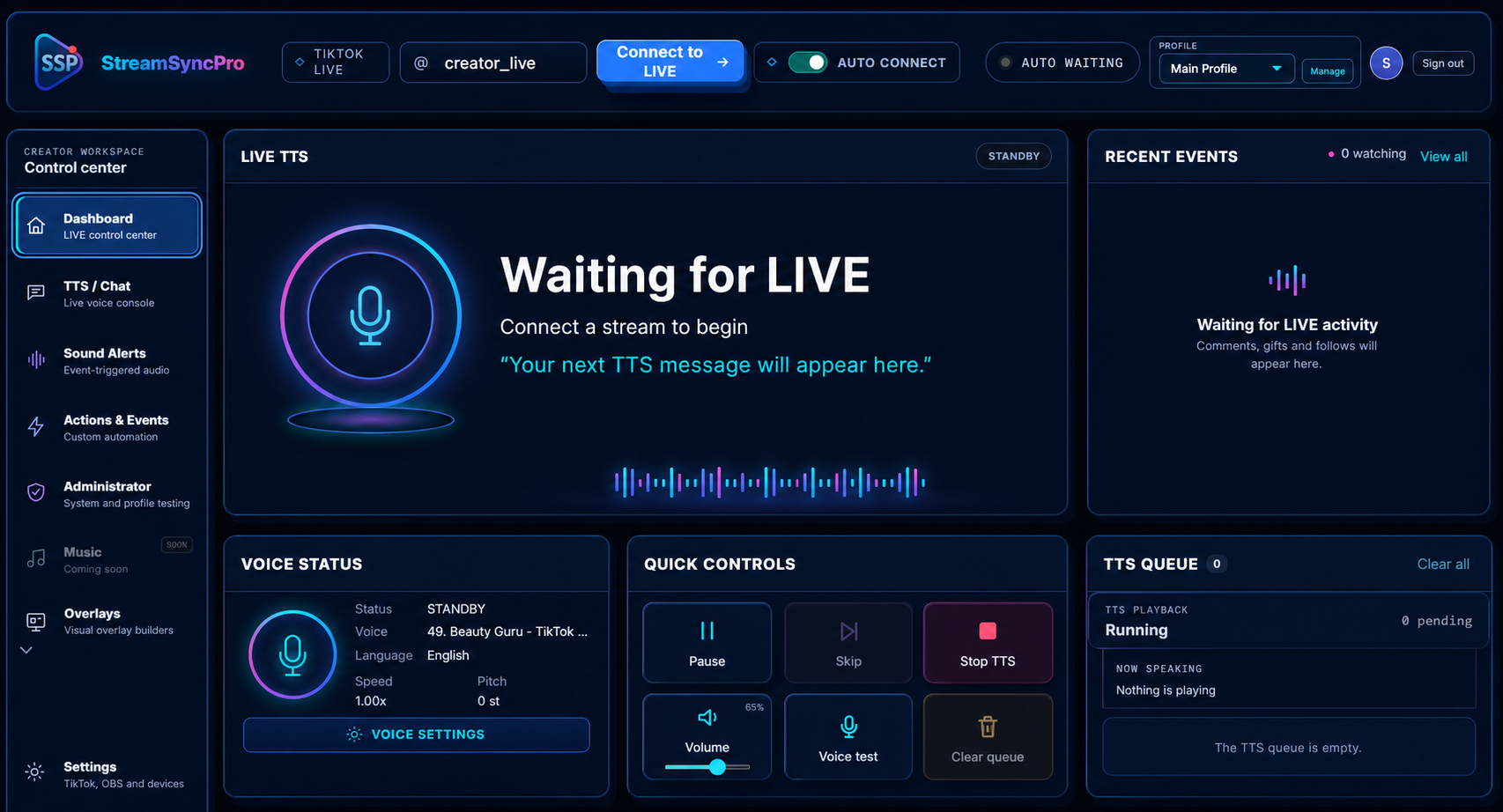
Stream Sync Pro dashboard showing LIVE TTS, recent events, voice controls and the TTS queue
StreamSyncPro
AUTO CONNECT
S
LIVE TTSSPEAKING
●
NOW READING

Welcome to the LIVE

“Your next comment can power the show.”
RECENT EVENTSLIVE
♥Chloe_xSent Rose ×5now
◆User123Sent TikTok Universe12s
★NinjaWolfTriggered Spin of Actions24s
QUICK CONTROLS2 QUEUED
ⅡPause▷Skip■Stop TTS
TTS QUEUEClear all
1@Kieran88That was amazing!
2@EmilyTry the challenge again
♥148 BPMThreshold action fired
♬Sound alertFist Bump played
One workspace for TikTok LIVETikTok TTSElevenLabsOBSPulsoidWebhooks
Creator toolkit

Start with the reactions that matter

Give chat a voice, turn events into reactions and save your setup in reusable profiles.

◉
01 / LIVE TTS

A voice system your viewers can make their own

Give trusted viewers a personal voice while you stay in control. Stream Sync Pro reads comments and selected LIVE events through TikTok TTS or ElevenLabs, translates speech when required and manages every message through one protected queue.

Choose a personal voiceViewers use !myttsvoice 7 to select a numbered voice from the language-filtered directory.
Reserve a voiceAfter sending your chosen qualifying gift, an allowed viewer can use !lockmyttsvoice to reserve an available voice for that LIVE.
Role-based accessAllow everyone, followers, subscribers, moderators, team, top gifters or selected users—and decide who may change voices.
Moderator protectionMute and unmute viewers with !mutetts and !unmutetts. Add or remove blocked words with !blockttsword and !removettsword.
Queue & anti-spam controlPause, inspect, skip or clear queued speech. Cooldowns, duplicate filtering and message limits keep busy chat under control.
Translation & voice matchingTranslate comments, gifts, follows and joins, restrict voices to the selected language, or enable a random fallback voice.
Your voice directory, your rulesPreview voices, allow or exclude individual voices, disable singing voices and set a minimum team level for TTS access.
More control over what gets readFilter repeated spam and commands, remove mentions, links or emojis, and maintain a banned-word list.
VIEWER VOICE CONTROLLIVE
K
@viewer_k!myttsvoice 7
VOICE ASSIGNED
ASSIGNED VIEWER VOICES3 active
A
@alex_live07 · English UK
LOCKED
M
@mia_streams12 · English US
CHANGE
J
@jayden03 · Character
CHANGE
MODERATIONModerator command received
!mutetts noisyviewer 30 Muted for 30 minutes
FOLLOWERSSUBSCRIBERSMODERATORSSELECTED
≋
02

Sound alerts

Build audio reactions for specific gifts, coin totals, likes, shares, follows, treasure boxes, level-ups and emotes.

  • Upload local sounds or search supported sound services
  • Gift repeats, volume and queue controls
  • Searchable gift catalogue with icons and coin values
🌶️ChilliGift · 10 coinsON
▶ PREVIEW
ϟ
03

Actions & events

Combine multiple TikTok triggers with a sequence of actions, then control their order, schedule, cooldown and duration.

  • Gifts, comments, likes, follows, shares, emotes and BPM
  • TTS, sounds, overlays, webhooks and OBS actions
  • Duplicate rules, drag-to-reorder and global enable switch
CHILLI REACTIONACTIVE
  1. 1Play soundImpact alert.mp3
  2. 2Change OBS sceneReaction Cam
  3. 3Speak with TTS{username} sent {gift}
♥
04

Heart-rate reactions

Show live BPM through Pulsoid or a compatible Bluetooth sensor and turn threshold crossings into part of the entertainment.

  • Configurable trigger and reset values
  • Near-threshold warning with custom sound
  • Test mode and multiple animated overlay themes
♥
142LIVE BPM
120140160
THRESHOLD ACTION FIRED
▣
05

OBS & creator integrations

Connect OBS WebSocket and coordinate scenes, sources and browser overlays with the rest of your LIVE automation.

  • Load available OBS scenes into action rules
  • Revert to the previous scene after a delay
  • Trigger webhooks and hosted browser sources
OBS CONNECTEDws://localhost:4455
LIVEMain SceneReaction CamBe Right Back
Go further

Music, desktop effects & connected tools

Choose the extras that suit your stream. Each feature stays in the same creator workspace.

♫

Spotify music requests

Connect Spotify and let permitted viewers request music using !play, skip tracks or reveal the overlay with !music.

  • Separate viewer, subscriber / Super Fan and moderator access
  • Point costs, cooldowns and per-viewer queue limits
  • Explicit-content and requested-track skip controls
  • Now Playing, requester, up next and paused-state display
  • Artwork toggle, marquee mode and timed auto-hide
Requires Spotify Premium and an active player. Spotify account-access restrictions may apply.
⌨

Desktop interaction effects

Bring gift-triggered surprises to your Windows desktop with fullscreen challenges and configurable input actions.

  • CAPTCHA screen challenge with the sender’s name and picture
  • Fullscreen jumpscares using local images, videos or supported media URLs
  • Pixel distortion with duration and display selection
  • Keyboard combinations, hold durations, mouse buttons and scrolling
  • Game-compatible scan-code keyboard mode
Windows desktop required. Game compatibility varies. Emergency input toggle: Ctrl + Alt + Shift + F12.
↗

LIVE analytics

Review recorded LIVE activity and learn which moments get your community involved.

  • Date-filtered activity and LIVE-session reporting
  • Viewer, like, comment and gift metrics where available
  • Top-supporter insights from captured LIVE events
  • Use results to refine your next goals and reactions
Reporting depends on events captured while connected; historical TikTok activity is not automatically backfilled.
⚙

Connected creator tools

Keep your setup working together, from your stream controls to your community.

  • Webhooks to toggle supported features from external tools
  • Per-account translation API tokens for integrations such as LocalVocal
  • Discord LIVE announcements and in-app feedback
  • Installable mobile web app on supported devices
  • Windows updates and account billing from inside the app
Join our Discord community →

Some features depend on third-party services, browser permissions or compatible devices. TTS voices and sound search may be unavailable during provider outages; fallback speech can use a different voice. Mobile background audio depends on your browser and operating system.

Overlay studio

Give every trigger an on-screen moment

Add your overlay URL to OBS or another browser-source compatible streaming tool. Customise fonts, colours, icons, animations, shadows and timing from your profile.

Gift Goal PalsGift JarsHeartMe targetsLike leaderboardLive Community CreditsSpotify Now PlayingSlider & marqueeSpin of ActionsJokesHeart RateStreamSyncPro promotion
Open the Overlay tools →
🌹ACTION & EVENTSending PositivityRose
😎ACTION & EVENTDJ GlassesSilly String
🎤SOUND ALERTVoice ChallengeConfetti
@viewer
SPIN OF ACTIONS
♥
148BPMHIGH HEART RATE!
Interactive gift goals

Small gifts. Big personalities.

Give your community a goal they can see growing, one gift at a time.

GIFT GOAL PALS
Room for one more gift?
ILLUSTRATIVE PREVIEW · YOUR GOAL, YOUR CHARACTER

Gift Goal Pals

Choose Piggy, Penguin, T-Rex, Pirate or Beagle. Gifts feed the animation as your target progresses—right through to the character’s big completion reaction.

  • Gift icons collect inside supported transparent-belly characters
  • Higher-value gifts appear larger, with configurable drop height and character flipping
  • Idle movement, speech bubbles and custom sound cues
  • Halloween and Christmas themes for supported pals, with their own phrases and sounds
GIFT JARSILLUSTRATIVE PREVIEW · FILL IT, THEN SPILL IT

Gift Jars

Watch gift icons tumble into your chosen glass design, settle inside its shape and spill over when there is no room left.

  • Classic, heart, animal and character-shaped jars
  • Christmas stocking and Halloween cauldron designs
  • Outer glow, larger high-value gifts and optional overspill
  • Cauldron bubbles, gift splashes and an animated bat companion
  • Goal completion options and contributor recognition
Keep everyone involved

Celebrate supporters. Add a little chaos.

More ways to recognise your community and put their reactions on screen.

♥

HeartMe & community goals

Build a HeartMe target, choose a seasonal style and celebrate when your community reaches it.

  • Custom targets and continue-counting completion behaviour
  • Trigger an existing action or sound alert at the goal
  • Like leaderboard with compact and transparent styles
  • Live Community Credits recognise gifts, likes and comments
  • Custom backgrounds, opacity, typography and colours
☺

Jokes, spins & scrolling reactions

Turn a selected gift into a joke, a wheel spin or a highlight on your reaction slider.

  • Joke categories, editable jokes and optional TTS with voice selection
  • Single-line joke marquee with speed control
  • Spin of Actions with the sender’s profile image and display name
  • Optional spin-click audio and timed winner auto-hide
  • Slider items stay in sync with linked gift triggers
Start your show

Your first interactive LIVE

Your profiles and settings follow your account, whether you use Stream Sync Pro in a browser or install the desktop app.

1

Sign in & choose a profile

Open the web app or desktop app and load a saved creator profile.

2

Connect to a TikTok LIVE

Enter the LIVE username. Auto-connect can wait and connect when the creator goes live.

3

Go interactive

Enable TTS, alerts, actions and overlay browser sources for the stream.

1. Connect your LIVE

Sign in to the web or Windows app, select your creator profile and enter your TikTok username. Start your TikTok LIVE, then select Connect to LIVE. Wait for the connected status before testing chat events.

Check Plans & Credits before connecting: a successful connection uses a credit unless you have an active subscription.

2. Enable and test TTS

Open TTS / Chat, choose a language and voice, and select which viewers may be read aloud. Use the voice test and check your volume. If your browser asks to allow sound, allow it for the app.

Start with moderator-only access while setting up. You can widen access and adjust spam filters once your test works.

3. Add an overlay to OBS

Open Overlays in the app and select a design. Copy its OBS URL. In OBS, add a Browser source and paste the URL, then adjust the source size and position for your scene.

Use the overlay's test controls to check the animation before relying on a real gift. Keep your personal overlay URL private.

Simple pricing

Credits or unlimited monthly access

Use one Stream Sync Pro account across the web app and Windows desktop app.

PAY AS YOU GO

See app / credit

One credit is used after a successful TikTok LIVE connection. Buy only what you need; unused credits remain on your account.

  • No recurring payment
  • Secure PayPal checkout
  • Credits work in both apps
Buy credits in the app

Check current pricing in the app.

Subscriptions renew monthly until cancelled. Payment details are handled by PayPal; Stream Sync Pro does not store full card details.

Pricing questions, answered

What does one credit pay for?

One credit covers a chargeable TikTok LIVE connection—not each comment, gift or TTS message. The app waits for a stable connection before deducting it; the default stability window is 10 minutes. You need an available credit or active subscription to connect.

Will a disconnect or update use another credit?

The app checks the LIVE connection identifier to avoid charging twice when reconnecting to the same previously charged LIVE. A connection that drops before the stability window finishes is not charged by that attempt.

Planned maintenance can also protect reconnects for affected accounts during a limited window. A new LIVE or a different connection identifier can be chargeable, so this is not a blanket promise of free reconnects. If your balance looks wrong, contact support with the TikTok username and approximate time—never your password or private overlay URL.

How is a monthly subscription different?

While your subscription access is active, successful LIVE connections do not spend credits. Your existing credit balance stays on your account. Subscription access works in both the web and Windows apps; it does not remove third-party service requirements or account connection limits.

How do I cancel, and when does access end?

Open Plans & Credits in the app and use the subscription cancellation option. Cancellation stops future renewals; access continues until the end date recorded on your account, including any applicable added days. Check the confirmation and your account's access date. Cancellation does not itself issue a refund.

Can I use a promo code?

Enter an eligible promo code during checkout. The checkout shows the discount and whether it applies to the first month or recurs monthly. The prices above are standard prices before any eligible discount; review the amount and renewal terms before approving payment.

Do I need to pay separately for desktop and web?

No. Sign in with the same StreamSyncPro account to use the same credit balance and subscription in either app. That does not mean multiple simultaneous LIVE connections are included. Optional third-party services may have their own charges or subscription requirements.

Need help with a payment? Contact support or join our Discord. Share transaction details privately, not in public channels.

◎
Instant access

Use the Web App

Open Stream Sync Pro in a modern browser—no installation required. Ideal for quick access and managing your creator profiles from anywhere.

  • Always on the newest version
  • Works across supported desktop browsers
  • Saved account and profile settings
Launch Web App →
▣
Windows app

Download the Desktop App

Install the dedicated Windows experience for background audio reliability, local device access and a focused creator workspace.

  • Automatic update support
  • Better fit for Bluetooth heart-rate devices
  • Windows 10/11 installer
Download for Windows ↓ Beta installer is currently unsigned; Windows SmartScreen may ask you to choose “More info” then “Run anyway”.
Need a hand?

Build your setup with the community.

Ask questions, share ideas or get help choosing your first reactions.